
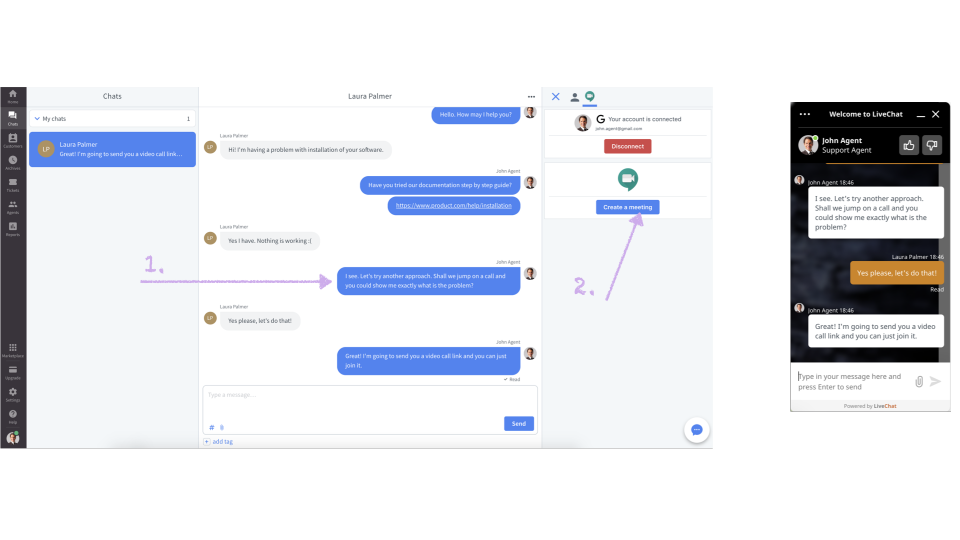

Use our Google Meet integration to avoid wasting time to chat back and forth to find a solution.
With the Google Meet integration you can easily create and share a meeting link within the Agent App while chatting to your customers.
The integration is using Google Calendar to manage meetings you create. This is very helpful because then you can track and edit those within the Google account. Your other agents can quickly preview their colleagues calendar and check who is on a call.
Installation:
- First get the app from the marketplace.
- Then from your Agent App Chat section you’ll be asked to connect your Google Calendar to LiveChat.
- Once connected, you can start inviting your customers to join video calls with you.
Key Features
Within few clicks you are ready to go and you can start inviting your potential leads and customers to video meetings.
Because of the Google Calendar integration, you can check who is on a call and who is available.
By jumping on a video call, you can help your customers quicker with their bugs and issues.
Video calls help solve your customers’ issues faster and can improve overall satisfaction.
App Terms
Legal Terms
By installing this app, you agree to the Marketplace Terms.
Tutorial & Support
How to use this app
Follow the app tutorial with setup instructions on how to use and properly configure this app with your LiveChat account. To get help and support contact Sikora Works. You can also suggest improvements or request new features in the upcoming versions of Google Meet.